> For the complete documentation index, see [llms.txt](https://karini-ai.gitbook.io/karini-ai-documentation/llms.txt). Markdown versions of documentation pages are available by appending `.md` to page URLs; this page is available as [Markdown](https://karini-ai.gitbook.io/karini-ai-documentation/dashboard-overview/cost-and-usage-summary/spend-by-generative-ai-application.md).
# Spend by Generative AI Application
Cost and usage details for the copilot can be visualized using the following dashboards: Total Cost, Total API Requests, and Total API Tokens. These dashboards provide valuable insights into the operational metrics and usage patterns of your copilots, helping you to understand the usage patterns, identify the cost drivers and manage and optimize their cost effectively.
### Total Cost
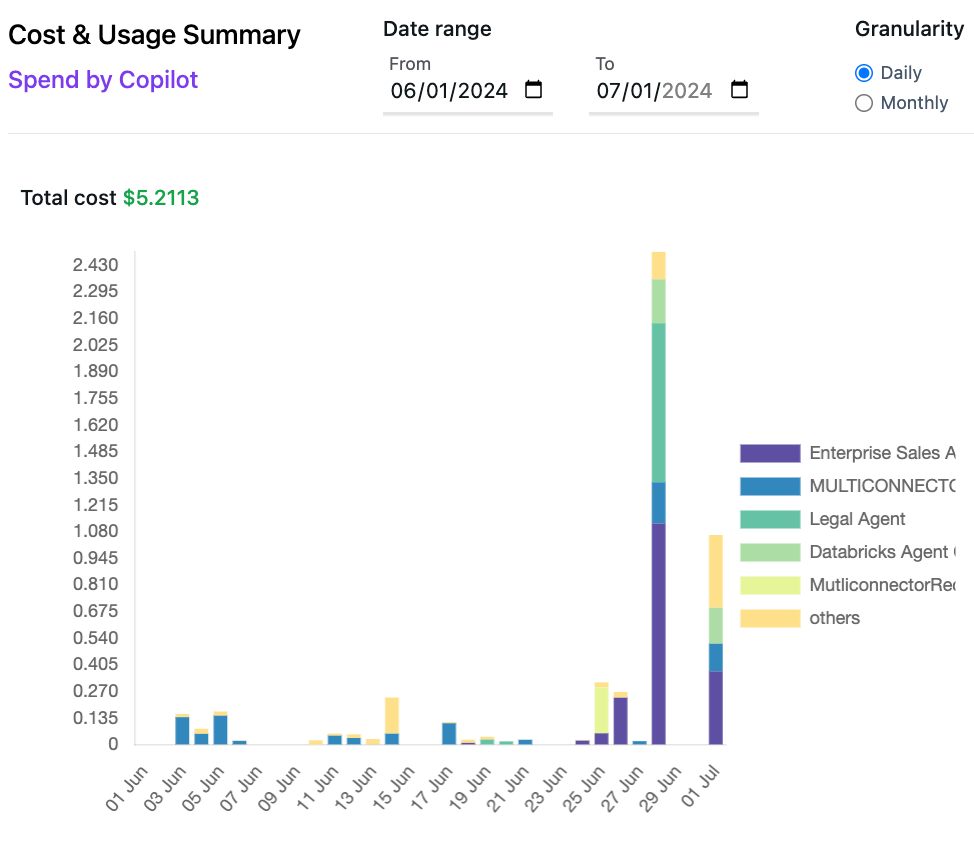
You can visualize total cost of the deployed copilots within your Organization. You have an option to chose all, or a set of specific copilots from the dropdown of available copilots. You can also select appropriate date range and granularity of daily or monthly.
For each copilot request, the cost is determined by summing up the costs of all the model endpoints involved in processing the request. This calculation factors in the respective model prices set in the [model hub](/karini-ai-documentation/model-hub.md) and the number of Input/Output tokens for each endpoint.
* This graph represents the total cost incurred by all the copilots within your organization.
* By default, when no copilot is selected from the dropdown, the graph displays the costs associated with the Top 5 copilots, with costs for all other copilots consolidated under **Others**.
* The right-hand side features a color-coded legend, identifying each of the Top 5 copilots and **Others** for easy reference.
* When you select copilot(s) from the dropdown, the cost of the selected copilot(s) is displayed, accompanied by a color-coded legend on the right-hand side of the graph.
* When you adjusts the date filter or granularity, the dashboard dynamically refreshes to display the corresponding data.
### Total API Requests
* This graph displays the total number of API requests processed by the selected copilot within the selected date range.
* By default, when no copilot is selected from the dropdown, the dashboard displays the Total API Requests associated with All copilots.
* When you select copilot(s) from the dropdown, the Total API Requests of the selected copilot(s) is displayed.
* This visualization helps in tracking the volume of requests and observing trends or patterns over the selected time frame.
### Total tokens
* This graph shows the total number of tokens consumed (Input tokens) and generated (Output tokens) by the model endpoint(s) when processing copilot requests during the selected timeframe.
* By default, when no copilot is selected from the dropdown, the graph displays the Total tokens associated with All copilots.
* When you select copilot(s) from the dropdown, the Total tokens of the selected copilot(s) is displayed.